

[비즈한국] It has been discovered that when using third-party alarm apps on Samsung Electronics005930 Galaxy devices, some standard Android features are restricted. When setting an alarm using the default Samsung app, an alarm clock icon appears at the top of the screen; however, this icon is "missing" for alarm apps downloaded by users separately. Since the display of the alarm icon is a standard feature of the Android operating system (OS), some critics argue that this could potentially limit competition for third-party app developers.
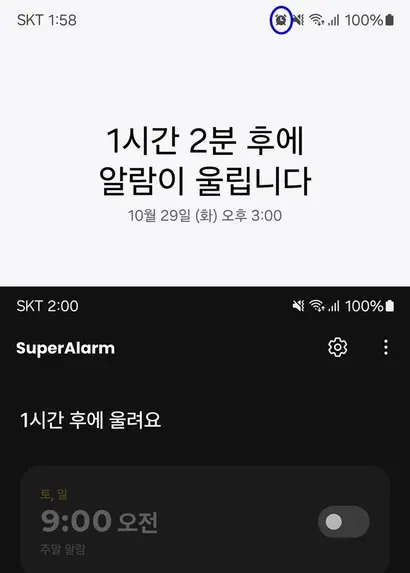
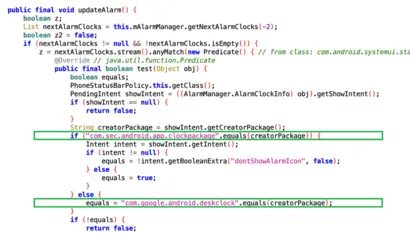
According to BizHankook's coverage, Galaxy devices are designed to activate the alarm icon only for the Samsung Clock app, which is pre-installed as the default, and the Google Clock app, which is the standard Android clock service. The Android OS includes a feature that displays a clock-shaped alarm icon in the status bar at the top of the screen when an alarm is set. By comparing the standard Android design with Galaxy's Android framework (the set of underlying program codes), it can be confirmed that settings have been added to prevent the icon from appearing for apps other than Samsung and Google clock services.
Kim Mu-gung, CEO of Peekiz (developer of 'Super Alarm'), told BizHankook, "The system is controlled so that the top icon is displayed only for their own default app and the Google Clock, identified by unique IDs that function like fingerprints for each app. On Android devices from other manufacturers, the icon is displayed normally. It is the same for all other external alarm apps." He added, "We have inquired about the technical and policy rationale behind restricting icon application for third-party developers and are awaiting a response."
Following the commencement of this coverage, the Super Alarm team raised this issue on the official Samsung Members community on the 29th. Samsung Electronics has been consulting on system improvements for the purpose of implementing user-friendly services if requested by external app development teams. Attention is now focused on whether functional support measures will be taken for this matter as well. However, it is known that Samsung Electronics' distinction regarding icon application was a measure taken in response to numerous customer complaints (VOC). Since there is a perspective that confusion could arise with the default alarm app if the same icon were generated by external alarm apps, the company is expected to make a judgment by considering various viewpoints.
The top area of a smartphone screen, where icons are displayed, is divided into left and right sides. The top left displays carrier information and the time, as well as icons for various app notifications such as KakaoTalk, while the top right, considered the manufacturer's area, displays icons for battery, data and Bluetooth connections, silent mode, and alarms. CEO Kim explained, "Due to the nature of alarm services, there is a difference in user experience. The top-right icon display is also a standard feature applied to alarms in Android. When you 'swipe' away notification messages, the icons on the left disappear along with them. To allow users to control situations where alarms might go off when not desired, they need to be able to see whether an alarm is currently set via the icon."
The global app ecosystem is trending toward openness. Previously in South Korea, the restriction of user choice due to "pre-installed" apps was discussed, centered around the Korea Fair Trade Commission, the Ministry of Science and ICT, and the Korea Communications Commission (KCC). In 2022, the KCC examined apps installed on 5 types of smartphones, including Galaxy and iPhone, and determined that 4 Samsung Electronics apps among the 63 pre-installed apps with deletion restrictions required removal measures.
While this current case is limited to controlling certain functions like icons, critics point out that it has the nature of a self-preferencing practice. Wi Jong-hyun, a professor at Chung-Ang University's School of Business, pointed out, "Because this involves excluding or obstructing a function that could be implemented by third-party apps, it can be seen as hindering competition from other app developers in terms of fair competition."
A Samsung Electronics official stated, "In accordance with our principle of open collaboration, we are conducting development reviews and collaboration with all partners to provide a better Galaxy experience to our customers."